

Travel Smarter: Why a navigation app is your cheapest travel insurance when exploring Madeira, the Seychelles, and beyond.
Getting lost in the tropics is not a fun adventure—it is an expensive and stressful mistake. Imagine spending thousands of euros on a trip to the Seychelles or Madeira, only to spend your precious afternoon wandering in circles because a trail marker was hidden by overgrown ferns. Worse, imagine losing your way in a deep volcanic canyon as the sun starts to set and your cell phone signal disappears.
We have used the AllTrails app in many different places like Madeira, Malta, Cyprus, Spain, or the Seychelles and it has never failed us. Whether we were deep in the misty levadas or hiking to hidden beaches, this tool has become a critical part of our travel blueprint.
In this review, we break down exactly how to use AllTrails to explore smarter, stay safe, and find the “soul” of every destination without the headache of getting lost.
Your Pro-Navigation Guide: Mastering AllTrails
Table of Content:
- Free, Plus, or Peak: Which Subscription Actually Makes Sense?
- AllTrails vs. Mapy.com & Other Navigation Apps
- Trail Tech Hacks: Solving Common GPS and Battery Issues
- Wearables Integration: Apple Watch, Garmin, and the “GPX Hack”
- Safety First: The Power of “Live Share”
- Slow Travel Tools: Community Heatmaps & Outdoor Lens
- Smart Logistics for Navigation
- Plan Your Next Adventure: Explore our Atlas
- FAQ: AllTrails in 2026
1. Free, Plus, or Peak: Which Subscription Actually Makes Sense?
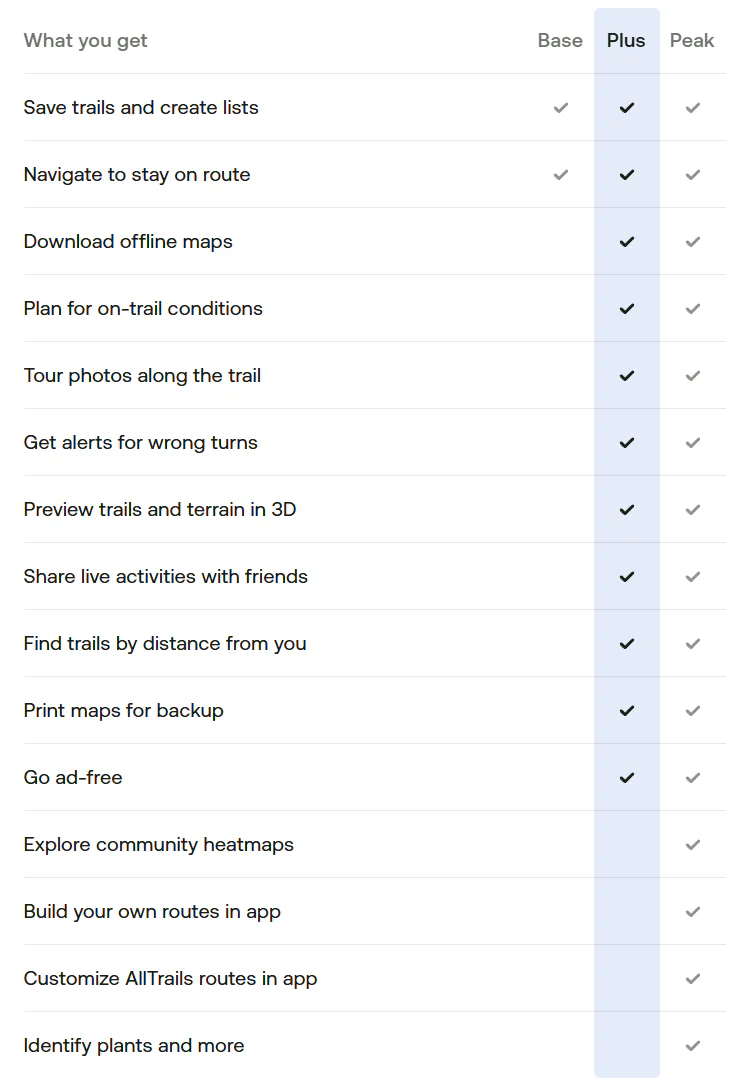
In 2026, AllTrails has structured its features into three distinct tiers. Most people start with the free version, but as “Comfort Adventurers,” we quickly realized where the true value lies. Here is the breakdown of what you get for your money.
The Base Tier (Free)
This is your entry point. It gives you access to a massive global database of over 550,000 curated trails. You can search for hikes, read recent community reviews, and see photos from other hikers.
The Best Part: You can create “Custom Routes” on your computer at home for free and save them to your profile.
The Dealbreaker: The free version requires an active internet connection to show the map. In the mountains of Madeira or the remote coasts of the Seychelles, cell service is non-existent. Without Offline Maps, the free version is just a digital guidebook you can’t use once you start walking.
AllTrails Plus (Approx. $35.99/year) — The “Must-Have” for Travelers
This is the tier we personally use and recommend. It costs about the same as one dinner in a tourist area, but it provides features that can literally save your life.
Offline Maps: You can download the map for your specific trail while you are still on the hotel Wi-Fi. Once you hit the trail, the GPS on your phone works perfectly even if you have “No Service.”
Wrong-Turn Alerts: This is our favorite feature. If you accidentally take the wrong path, your phone vibrates and sends an alert. On poorly marked tropical trails, this prevents hours of unnecessary backtracking.
Safety Features (Lifeline): You can share your real-time location and planned return time with a loved one. If you don’t return on time, the app automatically notifies them.
3D Previews: You can fly over the trail in 3D before you go to see exactly how steep the climbs are.
AllTrails Peak (Approx. $59.99/year) — The AI Powerhouse
This is the new top tier for 2026, designed for hikers who want the absolute latest technology.
AI Smart Routing: If a trail is closed or a storm is coming, the AI can instantly rebuild your route to find a shorter or safer way back.
Community Heatmaps: This shows you which trails are currently crowded and which are empty. It’s perfect for the “Slow Travel” philosophy—helping you avoid the crowds and find complete peace.
Outdoor Lens: Point your camera at a tropical flower or a strange insect, and the built-in AI identifies it instantly.
Our Tip: If you only hike a few times a year, the Plus version is the perfect balance. It provides all the safety features you need without the higher cost of the AI tools. It is the cheapest “insurance” you can buy for your trip.
2. AllTrails vs. Mapy.com & Other Navigation Apps
You might be wondering why you should pay for a hiking subscription when there are so many free maps available. As independent travelers who monitor our budget, we asked the same question. Here is how AllTrails compares to the alternatives when you are actually out in the wild.
The Google Maps Illusion
Everyone has Google Maps on their phone, and it is perfect for driving your rental car to the trailhead parking lot. However, the moment you step into the jungle, it becomes dangerously useless. Google Maps lacks detailed topographic lines, it does not show elevation changes, and many small hiking trails simply do not exist on its interface. Most importantly, even if you download a Google Map offline, it will not give you walking directions on wild trails.
Mapy.com (formerly Mapy.cz): The Free King
This app is the holy grail for budget backpackers in Europe, and we highly respect it. It offers incredibly detailed vector maps and allows you to download entire countries for offline use, completely for free.
So why pay for AllTrails? Because Mapy.com is a passive map, while AllTrails is an active guide. Mapy.com will not vibrate to warn you that you took a wrong turn at a confusing junction. Furthermore, it lacks the massive, real-time community feedback. In tropical climates, heavy rain can destroy a trail overnight. Reading an AllTrails review from two days ago saying, “The wooden bridge is washed out, wear waterproof shoes,” is a lifesaver that passive map apps simply cannot provide.
Komoot & Gaia GPS: The Niche Alternatives
Komoot: This is an absolutely fantastic app, but its algorithm is built primarily for cyclists and bikepackers. It excels at distinguishing between asphalt, gravel, and dirt roads, but for pure hiking, AllTrails has a better trail database.
Gaia GPS: This is a hardcore, military-grade mapping tool used by search-and-rescue teams. It is incredibly powerful but has a very steep learning curve. For a “Comfort Adventurer,” it is overly complicated. AllTrails hits the perfect sweet spot between professional safety and user-friendly design.
Our Tip: Use a hybrid approach! We use AllTrails Plus as our primary active guide for the specific hike. However, we always download the entire island map on Mapy.com as a free, secondary backup on our phones, just in case we decide to explore an unmarked area after the hike is over.
3. Trail Tech Hacks: Solving Common GPS and Battery Issues
Even the best navigation app is only as good as the smartphone running it. During our first few trips, we encountered a few frustrating technological “glitches” that almost made us stop using the app. It turns out, the app wasn’t broken—our phone settings were. Here is how to fix the three most common technical issues without needing a degree in computer science.
The “Straight Line” GPS Glitch
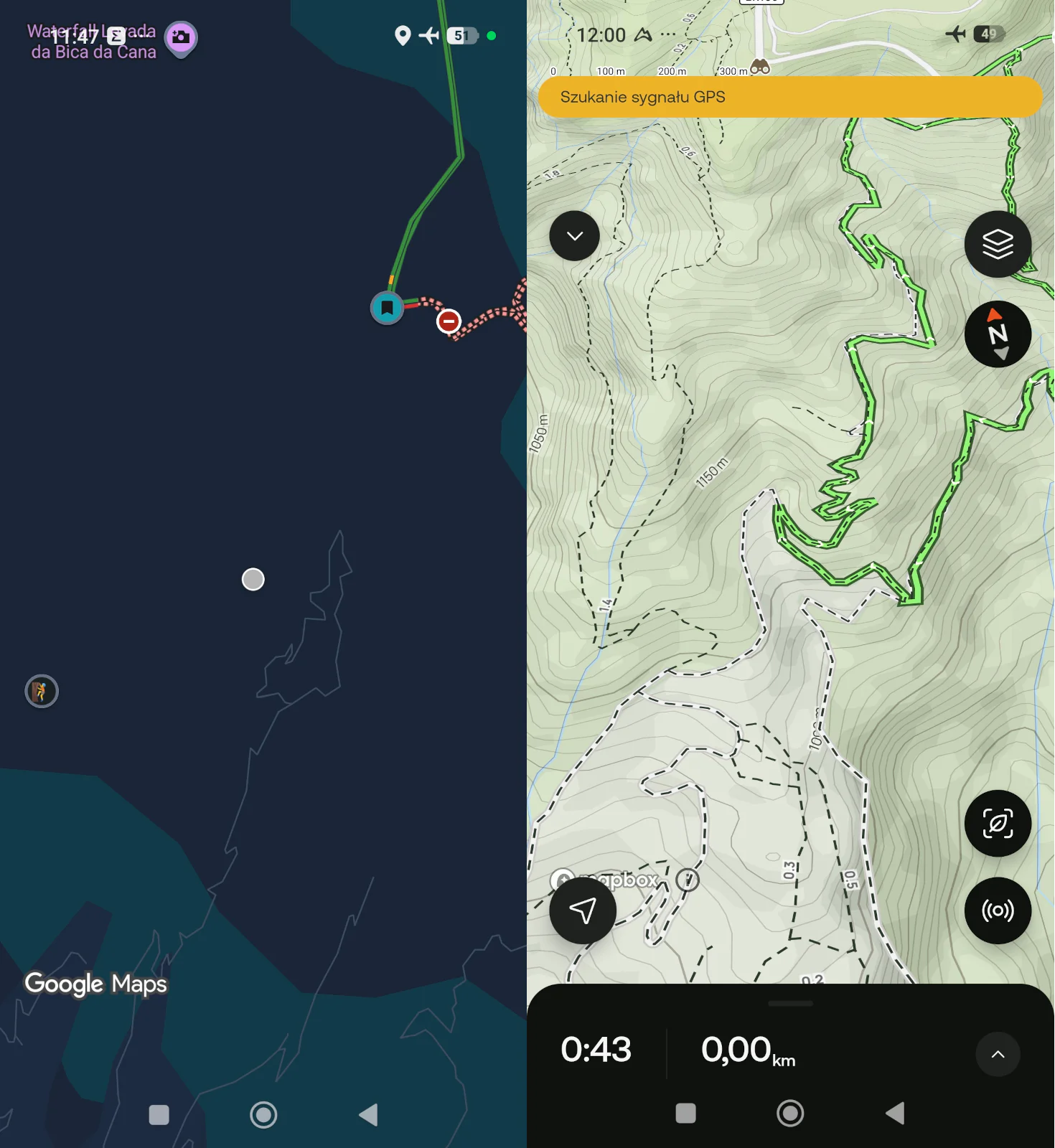
Have you ever finished a hike, looked at your recorded map, and seen abstract straight lines cutting across rivers and canyons instead of following the actual winding path?
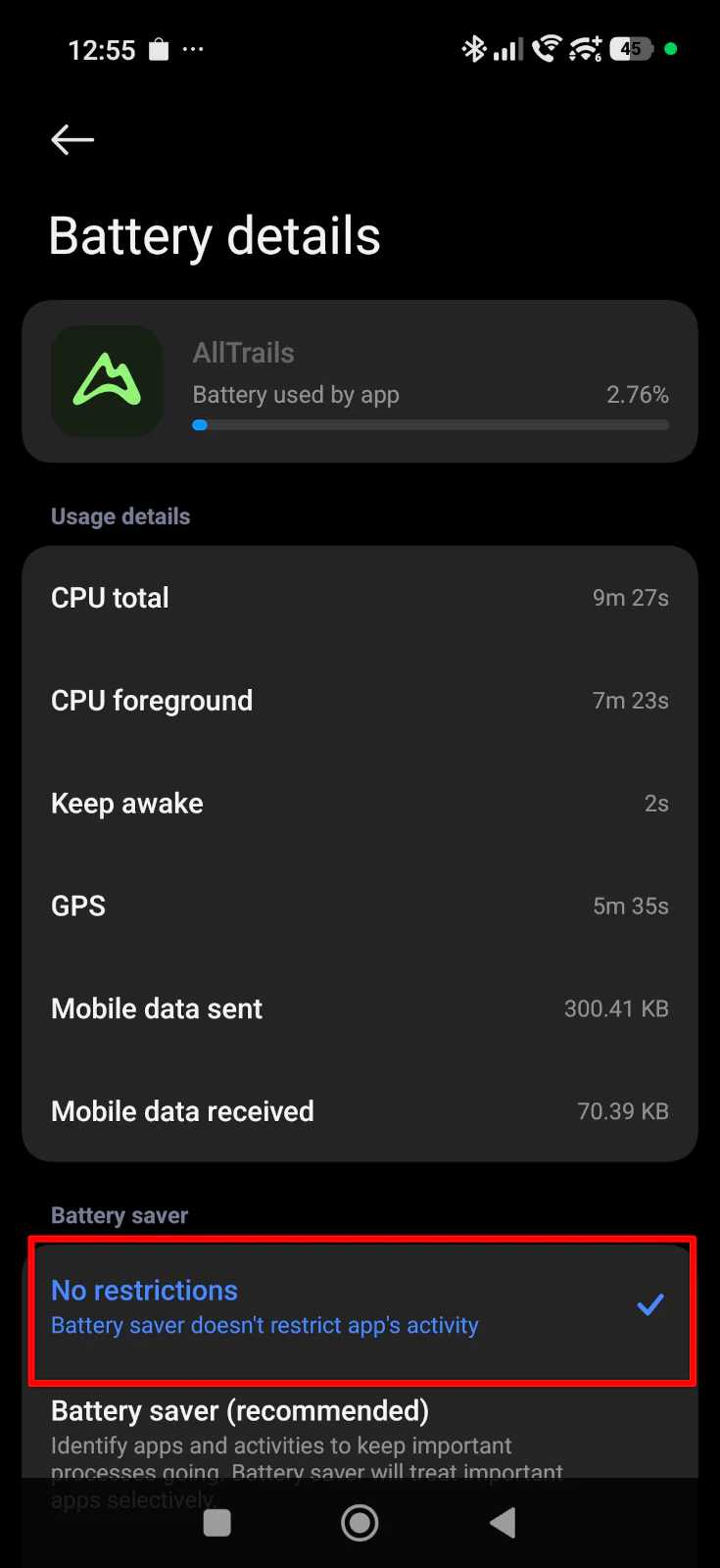
This usually happens because modern smartphones (especially Androids) have aggressive “Battery Optimization” features. When you put your phone in your pocket, the system puts the AllTrails app to sleep to save battery, effectively shutting off the GPS.
The Fix: Before your trip, go into your phone’s settings, find the AllTrails app, and change the battery usage setting from “Optimized” to “Unrestricted” (or turn off background battery limits). This forces the phone to track your exact position the entire time.
The Altitude Myth (Jumping Elevation)
Don’t panic if you are halfway up a mountain and the app says you have climbed 1,000 meters, but when you finish and save the hike, the summary drops to just 400 meters.
Your phone uses a built-in barometer and basic GPS to guess your altitude while you walk, which is highly inaccurate and constantly fluctuates.
The Fix: Just wait. Once you finish the hike and your phone reconnects to the internet, AllTrails uploads your raw data to their servers. The system then overlays your route onto highly precise, 3D satellite elevation maps to calculate your actual, mathematically correct elevation gain.
The Battery Drain Trap
Running a live GPS map while keeping your screen brightness at 100% to fight the tropical sun will kill your smartphone battery in a matter of hours. Losing your map halfway through a jungle trek is a nightmare scenario.
The Fix: Always download your map for offline use before you leave the hotel. Once you reach the trailhead, immediately switch your phone into Airplane Mode. The GPS receiver inside your phone works perfectly without a cellular connection. By stopping your phone from constantly searching for a weak cell signal, your battery will easily last the entire day.
Our Tip: Even with Airplane Mode turned on, technology can fail or overheat in tropical climates. Always carry a small, lightweight 10,000mAh power bank and a charging cable in your daypack. It is the cheapest and most effective safety net you can carry.
4. Wearables Integration: Apple Watch, Garmin, and the "GPX Hack"
Constantly pulling your smartphone out of your pocket on a steep, rocky trail is annoying and increases the risk of dropping your device down a cliff. Syncing your planned route with a smartwatch allows you to navigate with a quick glance at your wrist. Here is how AllTrails integrates with different ecosystems in 2026 based on their official capabilities.
Native Companion Apps (Apple Watch & Wear OS/Samsung)
If you use an Apple Watch or a modern Samsung Galaxy Watch running Wear OS, AllTrails offers a dedicated native app. It is fantastic for displaying your route, tracking your stats, and buzzing your wrist if you make a wrong turn.
The Catch: These are strictly “companion” apps. They are not standalone. To see the map and navigate properly, your smartphone must still be turned on, packed in your backpack, and actively connected to the watch via Bluetooth.
The “Pro” Setup (Garmin Direct Integration)
Dedicated outdoor watches from Garmin are built for extreme battery life and don’t require a live connection to your phone while hiking. If you have an AllTrails Plus or Peak subscription, the process is incredibly smooth. You can link your Garmin Connect account directly to AllTrails. With one tap of the “Send to Garmin” button in the AllTrails app or website, the route automatically syncs to your watch over the cloud.
The “Garmin Killers” (Amazfit T-Rex 3 Pro, Coros & Others)
What if you use a rugged, highly popular alternative like the Amazfit T-Rex 3 Pro or a Coros watch, which do not have direct integration or a native app? You are not left out; you just use the universal language of GPS navigation: the GPX file.
You simply find your desired trail on AllTrails, click the overflow menu, and select “Export route file” to download the GPX file to your device. Then, you open that file using your watch’s specific management software (like the Zepp app for Amazfit). The app will automatically read the route and beam it permanently into your watch’s memory for full offline navigation.
Our Tip: You do not need a paid Plus or Peak subscription to use the GPX hack! Any registered user can log into their AllTrails account, download the GPX file of any trail or custom route for free, and transfer it to their watch. It is the best way to get premium wrist navigation on a budget.

5. Safety First: The Power of "Live Share"
When exploring remote trails like the ones on La Digue or Madeira, peace of mind is invaluable—especially if you are hiking solo or want to reassure your family back home. Dropping a location pin on WhatsApp is practically useless in the wilderness because it only provides a static dot on a blank, featureless map.
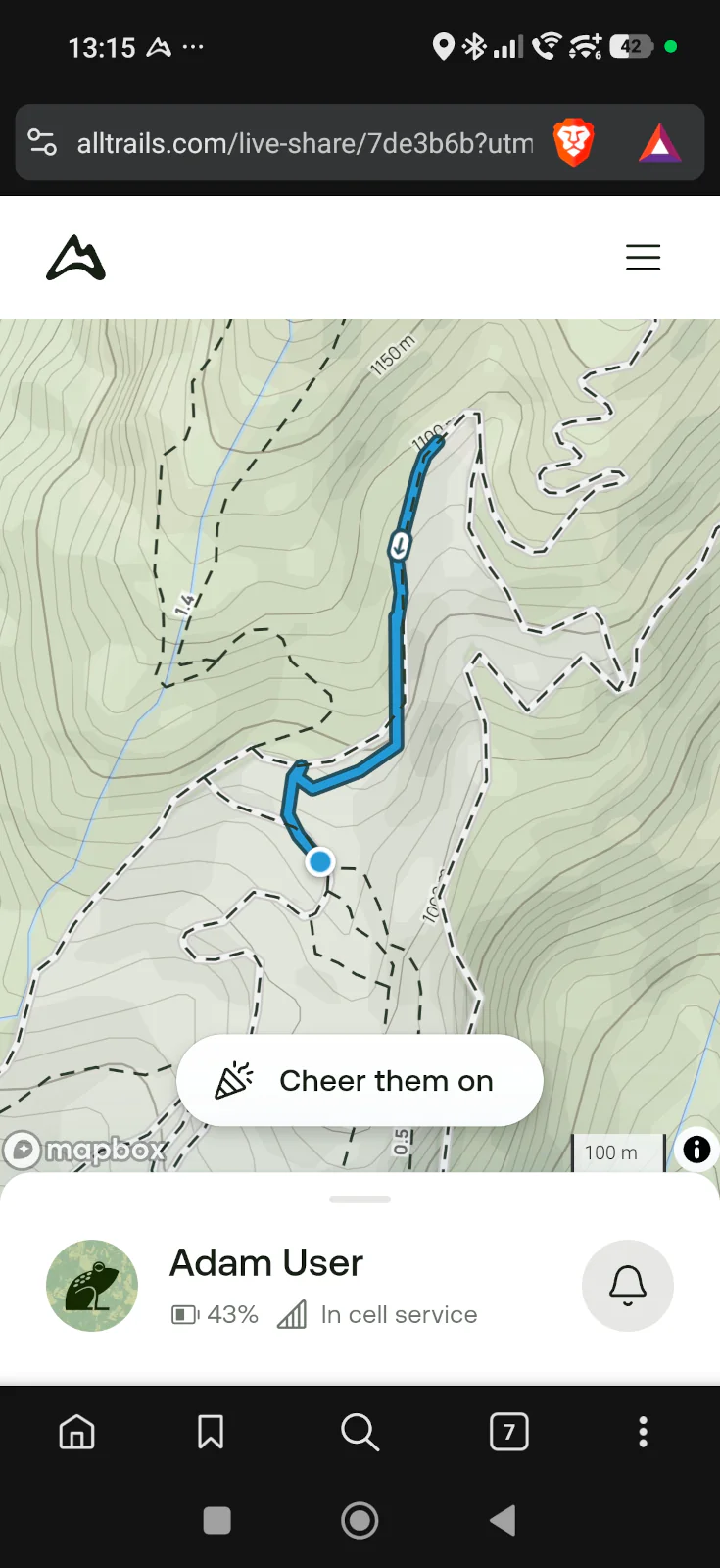
AllTrails offers a much more advanced feature called Live Share (available with the Plus and Peak subscriptions). Before you hit the trail, you generate a unique URL and send it to your trusted contacts. When they open the link, they don’t just see a dot. They see your entire planned route, your exact real-time location on the topographic map, your current pace, your estimated finish time, and—most importantly—your phone’s remaining battery percentage and GPS signal strength.
If you stop moving for two hours but your battery is still at 80% on a steep climb, your emergency contacts will have a clear, contextual signal that you might need physical help rather than just experiencing a dead phone.
Our Tip: Remember that Live Share absolutely requires an active cellular data connection (roaming or a local eSIM) to push your real-time updates to the server. If you enter a deep canyon and lose signal, your family will only see your “last known location” and the timestamp until you reconnect.
6. Slow Travel Tools: Community Heatmaps & Outdoor Lens
For “Comfort Adventurers,” avoiding the masses and truly connecting with nature are top priorities. The newest updates to the AllTrails platform cater perfectly to the “Slow Travel” philosophy, making it more than just a navigation tool.
Avoiding Overtourism (Community Heatmaps)
If you opt for the Peak tier, you unlock the Community Heatmaps feature. This tool uses anonymous telemetry data from millions of users to visually display which trails are heavily trafficked and which ones are practically deserted. If you want to experience the quiet, meditative side of a popular destination, this feature acts as your personal guide to avoiding the crowds.
The AI Nature Guide (Outdoor Lens)
You no longer need to carry a heavy guidebook or drain your battery by constantly switching between your map and external identification apps like Seek by iNaturalist. AllTrails has integrated AI directly into its navigation interface. With the Outdoor Lens, you simply point your phone’s camera at an unfamiliar tropical flower, strange insect, or tree along the trail, and the AI identifies it instantly. It is a fantastic way to educate yourself about local ecosystems while strictly adhering to “Leave No Trace” principles.

Smart Logistics for Navigation:
The Power Bank Rule: Constant GPS tracking combined with maximum screen brightness (which you need to fight the tropical sun) will drain your smartphone battery in a matter of hours. Always carry a lightweight 10,000mAh power bank and a fast-charging cable in your daypack.
The Airplane Mode Hack: Once you reach the trailhead and open your downloaded offline map, immediately switch your phone to Airplane Mode. Your phone’s internal GPS receiver will still track your location perfectly, but the device will stop wasting massive amounts of battery trying to find a non-existent cell signal in the jungle.
Manage Device Heat: Smartphones can easily overheat and shut down in tropical climates, especially if kept in direct sunlight or inside a sealed, dark waterproof bag. Keep your phone in a shaded, ventilated pocket of your backpack when you aren’t actively checking the map.
The Ultimate Backup: Technology fails, and batteries die. For remote, full-day treks, log into the desktop version of AllTrails, print a physical paper map of your route, and keep it in a ziplock bag. It weighs nothing and is the ultimate fail-safe.
Plan Your Next Adventure: Explore our Atlas
If you want to see how we used AllTrails to discover hidden gems, check out our dedicated destination hubs.
Browse our full [Destinations Catalog] to see our custom-mapped routes in Madeira and the Seychelles, or check our [Practical Travel Tips] for more gear reviews.
FAQ: AllTrails in 2026
Does AllTrails work offline without the internet?
Yes, but only if you have an AllTrails Plus or Peak subscription. You must download the specific trail map to your phone while connected to Wi-Fi. Once downloaded, your phone’s built-in GPS will track your location on the map even with zero cell service. The free (Base) version does not support offline maps.
Is the Peak tier worth it for a one-week vacation?
For most “Comfort Adventurers,” the answer is no. The Plus tier (approx. $35.99/year) provides all the crucial safety features you need, including offline maps and wrong-turn alerts. The Peak tier is an excellent upgrade for frequent, hardcore hikers who specifically want AI smart routing and community heatmaps.
Can I use AllTrails on my Apple Watch without my iPhone?
No. In 2026, the AllTrails apps for Apple Watch and Wear OS (Samsung) are still “companion” apps. Your smartphone must be powered on and actively connected via Bluetooth in your backpack for the watch app to function and display navigation prompts.
How do I send an AllTrails route to my smartwatch if there is no native app?
If you use a watch like the Amazfit T-Rex 3 Pro or an older sports watch, you can use the “GPX Hack.” Log into the AllTrails website on a browser, click “Export route file,” select the GPX format, and then import that file into your watch’s management software (like the Zepp app). You can do this even with a free AllTrails account.